 Tabivore
What happens to Arc, and when
“Arc is being sunset on December 22, 2026. On that date, Arc for macOS and Windows will stop working, you’ll no longer be able to sign in to your Arc account, and we’ll turn off all Arc services.”
— The Browser Company, Arc Sunset: Key Dates and What to Expect, Arc Help Center
| Date | What happens |
|---|---|
| October 22, 2026 | The sunset is announced. New Arc accounts can no longer be created. |
| November 23, 2026 | Arc Search AI features are turned off; Arc on the desktop starts showing reminders. |
| December 15, 2026 | The last day to request a copy of the personal data Arc holds on its servers. |
| December 22, 2026 | Arc for macOS and Windows stops working, accounts are deactivated and Arc services are turned off. |
The news was also covered by TechCrunch and The Verge. The Browser Company suggests moving to its other browser, Dia, which can bring over your Spaces, pinned tabs and more (Move from Arc to Dia). If you want to stay closest to Arc, that is the simplest move. This page is for those going to Chrome or Firefox.
Before December 22: save what is in Arc
- On a Mac, open Arc, then Settings, Advanced, Export Data. Arc saves a file called “Arc Data Export.md” with your Spaces and their tabs as links.
- On Windows, open Settings, Advanced, Export Spaces and tabs.
- The export is a list of links, not a full backup. Check your passwords and bookmarks separately while Arc still opens.
Steps from How do I export my data from Arc? in the Arc Help Center.
Keep the back-to-close habit
In Arc, when you opened a link in a new tab and went back, the tab closed and you were where you started. Chrome and Firefox do not do that: a tab opened from a link has an empty history, so Back has nowhere to go and the tab stays.
An extension cannot simply change what Back does. Browsers do not tell extensions about the toolbar Back button or their own swipe-back gesture. So Tabivore recognizes the swipe itself:
- A small script on the page watches for a two-finger swipe back on the trackpad. It does not read the page and sends nothing anywhere.
- If the tab was opened from a link, the tab closes and the page that opened it is in front of you. A drop pulls out of the edge of the screen while you swipe.
- A tab you opened yourself is never closed by the swipe. If a tab cannot be closed, a short hint says so.
- The swipe can be turned off on any site, and its length and direction are in the settings.
The honest limits
- It is a trackpad gesture, tuned on a MacBook trackpad. On other trackpads you may need a different swipe length.
- The mouse Back buttons, the keyboard shortcuts and the toolbar Back button do not close tabs in Tabivore.
- Like every extension, Tabivore does not run on the browser’s own pages, such as settings, or in its extension store.
On a mouse or keyboard, other small extensions do back-to-close: Back to Close Tab and Close on Back react to the mouse Back buttons and shortcuts, and Last Tab Back to Backspace or a key you choose. More in swipe back to close a tab.
Auto-archive, to a shelf you can see
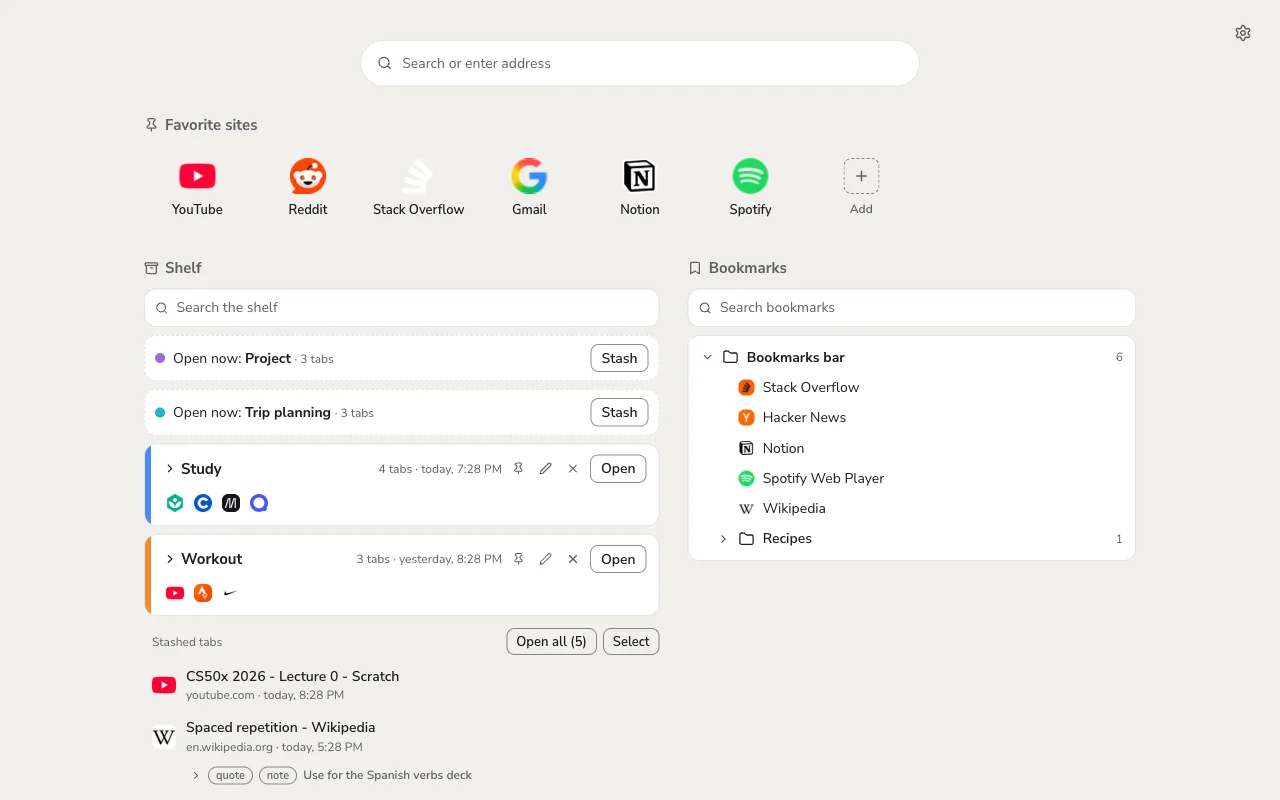
Arc archived unpinned tabs you had not looked at for 12 hours. In Tabivore auto-archive is optional and off by default. Turn it on, pick the time, and idle tabs move to the shelf on your new tab page, where you can search, pin and reopen them. Every removal can be undone.
Arc habits in Chrome and Firefox
| In Arc | With Tabivore in Chrome and Firefox |
|---|---|
| Back closes a tab opened from a link | A two-finger swipe back on the trackpad |
| Auto-archive after 12 hours | Optional; idle tabs go to the shelf after the time you choose |
| Pinned tabs and favorites in the sidebar | Favorite sites and pinned shelf items on the new tab page |
| Folders | A whole tab group stashed and reopened as a real group, with its name and color |
| Notes and Easels | Quotes from a page, with your own note |
| Spaces, vertical sidebar, Peek, Little Arc | Not in Tabivore |
| Sync with your Arc account | Not in Tabivore: everything stays on your device |
What Tabivore is not
Tabivore is an extension, not a browser, and not a copy of Arc. It does not import your Arc data, and it adds no sidebar, Spaces, Peek, Little Arc or sync. If those are what you will miss most, look at browsers built around them, starting with Dia. More on what carries over: Arc features in Chrome.
The shelf: closing a tab without losing it
Back-to-close works because you trust that nothing is lost. Tabivore’s main part is the shelf on your new tab page: stash a tab or a whole tab group in one click, close it, and it waits there with your quotes and notes, next to your favorite sites and bookmarks. It is free, has no account and keeps everything in your browser. See the shelf and everything else, or compare Tabivore with other tab managers.