 Tabivore
At a glance
| OneTab | Toby | Session Buddy | Workona | Tabivore | |
|---|---|---|---|---|---|
| Chrome Web Store users | 2,000,000 | 300,000 | 1,000,000 | 200,000 | Launched October 2026 |
| Price | Free | Free up to 60 saved tabs; from $4.50 a month | Free | Free sign-up; paid Pro and Team plans | Free |
| Account | Not required | Yes | None | Yes | None |
| Where your saved tabs live | In the browser | Its cloud, synced to your account | On your device | Its cloud | On your device, no network requests |
| Sync between computers | Optional, encrypted | Yes | No (cloud option planned) | Yes | No, on purpose |
| Tab groups | — | Saved with color, reopened as a group | — | Spaces per project | Stashed with name and color, reopened as a real group |
| Best for | Clearing a whole window into a list in one click | A visual board of collections, shared with a team | Saving and restoring whole sessions, crash recovery | Project workspaces with cloud sync and teams | Keeping a few tabs and groups in sight on the new tab page, locally |
OneTab
The classic: one click turns every tab in a window into a list, which you restore one by one or all at once. Free, no signup, in Chrome, Firefox, Edge and Safari, with optional encrypted sync. OneTab vs Tabivore: the full comparison.
Toby
A board of collections on the new tab page, synced to every computer you sign in on, with notes and team sharing. The free plan holds up to 60 saved tabs. Toby vs Tabivore: the full comparison.
Session Buddy
A session manager: it saves all open tabs in one click, restores them later, recovers tabs after a crash and exports in more than fifteen formats. Free, local, no account. Session Buddy vs Tabivore: the full comparison.
Workona
A workspace manager: a space per project with its tabs and resources, saved automatically to its cloud and synced across computers, with tab suspension and team plans. Workona vs Tabivore: the full comparison.
Tabivore
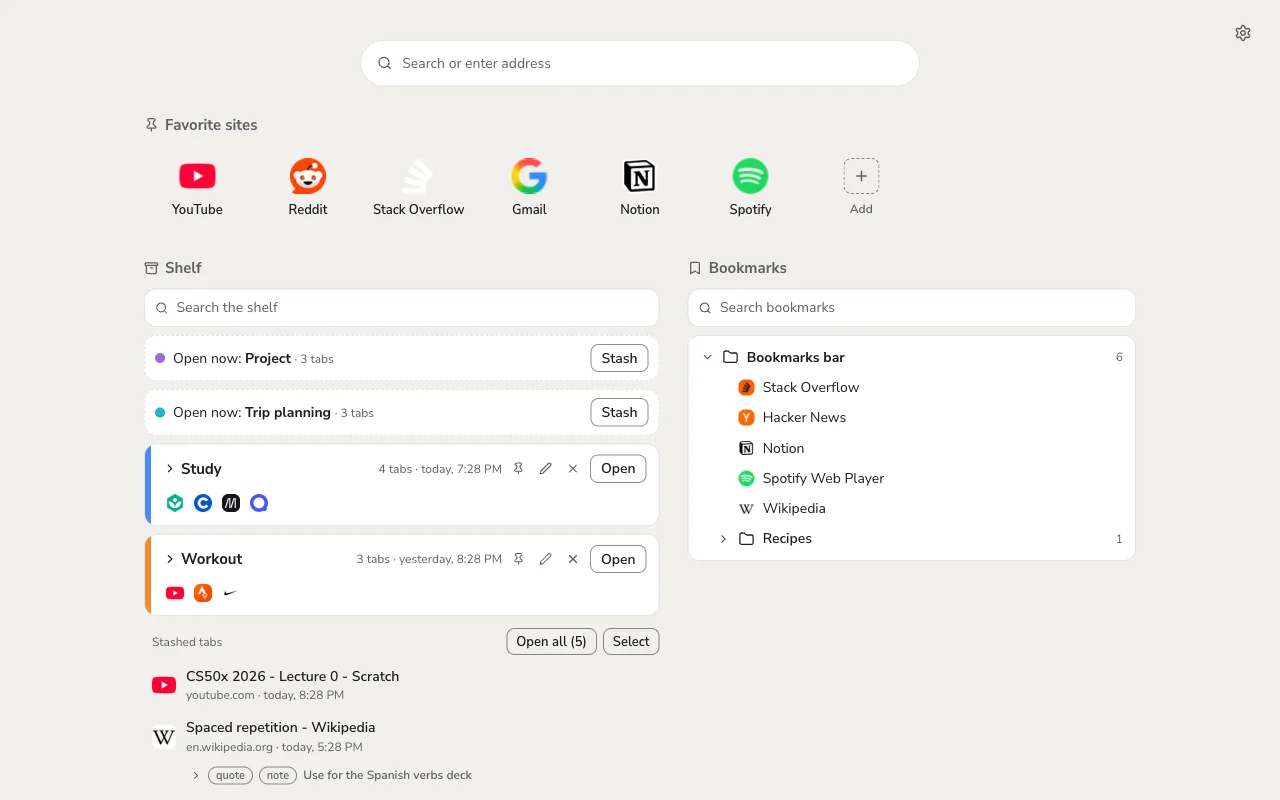
Tabivore keeps what you want to come back to on a shelf on your new tab page: single tabs, whole tab groups that reopen as real groups, and quotes with your notes. It is free, has no account and keeps everything on your device. On a trackpad, a tab you opened from a link can also close with a back swipe (how it works). It is new, and smaller than the others: no sync, no sessions, no team features.
How to choose
- You want one click that clears the whole window: OneTab.
- You want a board synced to every computer, or shared with a team: Toby or Workona.
- You save and restore whole sessions and want crash recovery: Session Buddy.
- You want a few tabs and groups in sight, with no account and nothing leaving your device: Tabivore.
- You only want Back to close a tab: Close on Back or Last Tab Back on a mouse or keyboard, Tabivore on a trackpad.
Extensions that close a tab with Back
If what you miss is Back closing a tab opened from a link, as in Safari or Arc, these small extensions do only that. Browsers do not tell extensions about the toolbar Back button or their own swipe-back gesture, so each picks another trigger.
| Close on Back | Last Tab Back | Tabivore | |
|---|---|---|---|
| Chrome Web Store users | 954 | 906 | Launched October 2026 |
| Version and last update | 3.17, August 13, 2025 | 0.8.0.4, June 24, 2024 | October 2026 |
| What closes the tab | Going back on the last history page of a tab | Backspace, a custom key, or its toolbar button, when there are no pages to go back to | A two-finger swipe back on the trackpad, recognized by a small script on the page |
| Which tabs close | The active tab, when it has no earlier page to go back to | A tab with no pages to go back to; not while a form field is focused or in the Web Store | Only a tab opened from a link; a tab you opened yourself is never closed by the swipe |
| Beyond closing tabs | — | — | A shelf on the new tab page for tabs, tab groups and quotes; optional auto-archive of idle tabs |
- Close on Back. Closes the tab when you go back from its first page, with the mouse Back buttons or keyboard shortcuts. Tiny and free. Close on Back vs Tabivore.
- Last Tab Back. Backspace, or a key or mouse button you choose, closes a tab with nothing to go back to and returns to the tab that opened it. Last Tab Back vs Tabivore.
Leaving Arc before it stops working on December 22? See how to keep back-to-close in Chrome and Firefox and which Arc habits you can bring to Chrome.